¶ PCB Layout and Design
As emerging engineers you need to learn how to use certain industry-standard tools for the automation of tasks or digital developement of circuits and projects (so as to optimise production costs, heating elements in a circuit, electo-magnetic compatibility etc). Some of the most common tools at your disposal are Computer-Aided Design programms which are present in every engineering feild (think of AutoCAD, SolidWorks). As electronics engineers, of course, we have our own tools, one of which being KiCAD.
KiCAD is completely free and open-source, so every student can install it on day one without licenses, paywalls, or feature restrictions getting in the way. It's also the same tool used in real professional and open-hardware projects - notably by CERN - meaning the skills you learn transfer directly to the real world.
¶ Workbook
What we want to teach you is a plethora of digital skills needed to use this tool in order for you to become independent engineers. This means that we will be exploring Schematics design, PCB Layout fundamentals, Footprint editing and formulating real and applicable Bills of Materials.
While this implies that we have a lot of work to do, our 8-hour course covers all of the fundamentals, so don't worry - at the end, you will have designed your own Printed Circuit Board!
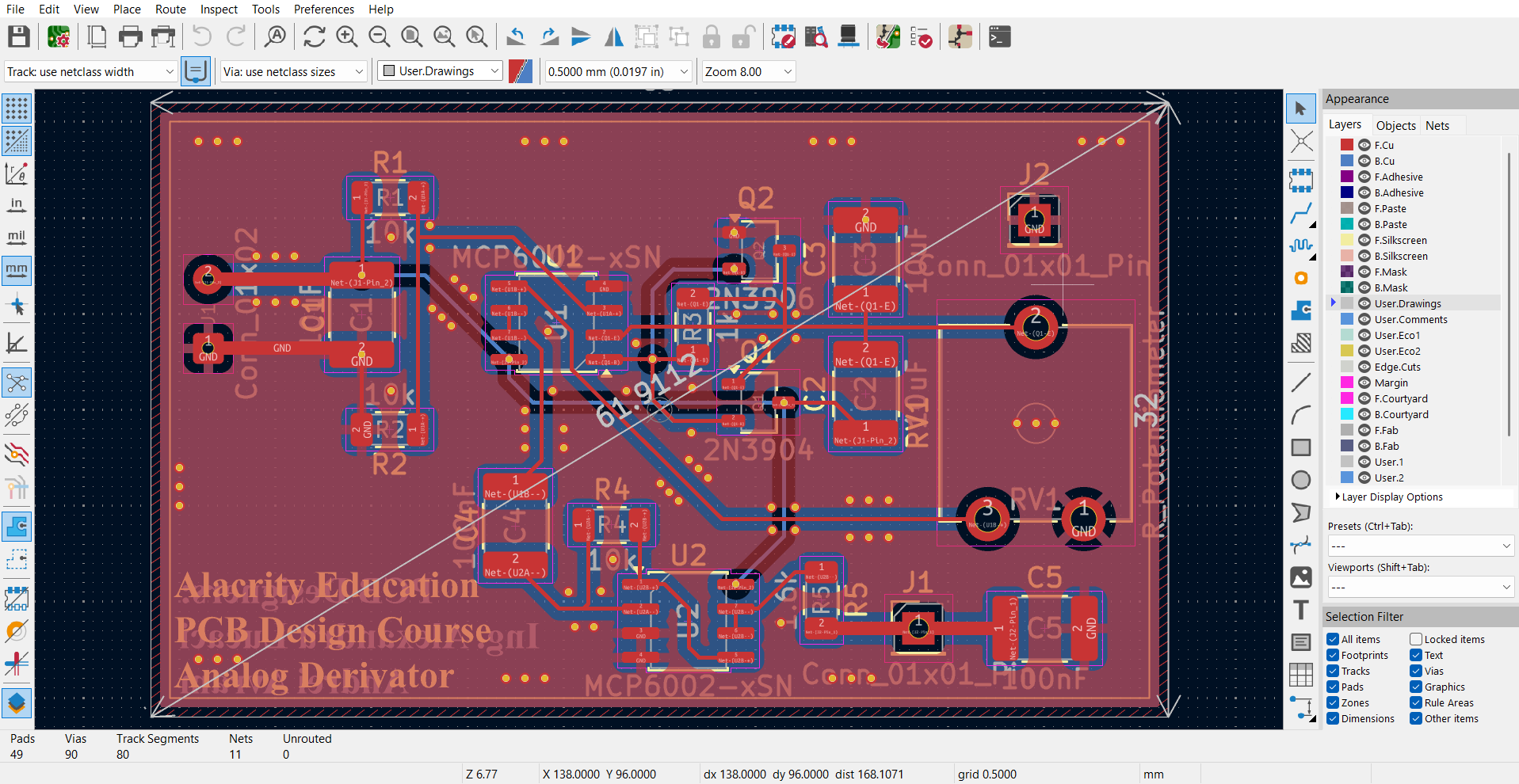
This time around, you will design and implement an Analog Derivator, a fully analog circuit which takes a given signal and computes its derivative using a resistive devider, a fwe coupling capacitors, a low-pass filter, two bipolar-junction transistors and four operational amplifiers. Of course, we will guide you through the nitty-griddy of the functionality of the circuit before designing and testing it.
You can find on Google Classroom more materials about the course and what we aim to do. Here, you can find a few more details about our time table and what we want to achive.
The course is titled LNPCB - Late Night Printed Circuit Board.
¶ First Session - LNPCB 1 (2h)
This two hour session aims to familiarize you with the circuit we proposed to design togheter (which can be found on our wiki in the Project Folder - Analog Derivator) and with the fundamentals of KiCAD and eCAD tools in general.
¶ Second Session - LNPCB 1.5 (2h)
Now we go in deep - we will learn about digital schematics, PCB layouts, THT and SMD components, different types of component libraries, general routing and tracing rules and other tools.
We design or schematic and we move onto the PCB Editor. We have two hours at our disposal to learn how to read datasheets, how to search for footprints of components, how to efficiently place components on a board and what our board contains - this means all the layers of a printed circuit board.
¶ Third Session - LNPCB 2 (4h)
Finally, we route our components and we learn about good practices in the industry, how we output fabrication documents for manufactures and we discuss about analog vs. digital design and what are the next steps in your future PCB Designer careers!
The order of lessons is subject to change uppon the arrival of the students at the Airobox Bootcamp!
¶ Schematics Design
¶ Components Library
- This menu presents all the components we have at our disposal, either found by default or added by us (usually taken from the web, from suplier or manufacturer pages)
- Components are either discrete (stand-alone elements, not ICs) or integreated cicuits/more complex (in our example, we use MCP6002, which is an integrated circuit produces by Microchip which contains two operational amplifiers)
In the same family of ICs, Microchip also provides components from one up to four integrated operational amplifiers in the same package - this is a standard practice in the industry!
We find out more info about them in the datasheets of manufacturers, whom we will explore further in the course.
- There also is a Power Components Library which contains elements used for simulations or other general usage appllications (Vcc, GND, GND0, flags etc.)
¶ Buttons present on the right-hand side menu
- Wires, just like their name entails, make connections between components - nodes are eiher made automatically or manually using the Place node button - crossing two wires doesn't mean that KiCAD will place a node there, so we have more freedom when connecting components; busses are connections inside processors or between high-end components (I/O ports to a von Neumman architecture or to a Memory Unit like RAM or ROM).
- Place No Connect is used when one wire or pin doesn't have an electrical connection (e.g. unused pin on a 555 Timer, wire which eventually will connect to an element outside of the board etc).
- Net labels help electronics engineers to not overcrowd the schematics page . When tackling bigger and more complex projects, net labels help us to compartimentalize hardware blocks for bigger PCBs.
Net lables or specific connections (to GND, from either + or - from a source) are written on the traces on the PCB in the PCB editor - they will not be shown in the final programm unless enabled by the user.
- To make links between different pages (for advanced PCB Design) we use Place Sheet Pins.
- Highlight nets is used to highlight different parts of the schematic based on electrical connections.
¶ Modyfing schematic components
- Select a component and press E - A new menu will show -> Symbol Properties. Here, you can modify different characteristics of each component. Let's take them one by one.
- Reference - "Nickname" of the component - automatically incremented by KiCAD
- Value - Numerical value in the IS of the component
- Footprint - Assigned either by the user or automatically by the manufacturer when a new component is entered by the user from the web or by default when a specific symbol as an industry-stadardized footprint (usually by a certain manufacturer - e.g. MCP6000 series)
- Datasheet - Catalogue of component's particularities made by the manufacturer
- Description - Field dedicated to describing the functionality of the component
- Add field - Complementary fields of data added by the user
¶ PCB Layout
¶ Selecting footprints
- Learn the difference between THT and SMD components!
- Determine what type of components you want to use and input them in the schematics editor.
- Learn about industry-standardised dimensions of electonic components.
¶ Placing footprints
- Place Footprints - Button for additional footprints incorporated in our design (mounting holes, castellated edges, pins etc).
- Route Signal Track - With additional menus, we can route components however we want!
- Place Via - Place a copper-plated hole that drives the signal on another layer of the printed circuit board.
- Draw Field Zones - Make modifications in a certain area regarding a certain layer or package of layers.
- Draw Rules Area - Make an area which doesn't follow general rules set by the user or by the programm.
- Drawing Elements - Draw elements on each layer individually, write text on the board or only seen by the user.
¶ Design Rules Check
- What is DRC how we to use it for our advantage.
- Why is DRC so important? How do programs visualize and calculate DRC? Is KiCAD the only high-end tool capable of doing DRCs?
- Learn how to avoid DRC when responding to the need of clients.
¶ Board Setup
- Elements regarding the construction of the PCB and guidance for the manufacturer.
- 3D Viewer - see what you designed! A very useful tool for engineers to better visualize what they modified on their board.
- Ground Planes and GND Vias.
¶ Fabrication outputs
- Now that you know how to design a board, learn how to actually send one to a manufacturer! We will tackle Gerber & Excellon files, .xml, .pos, .rpt.
¶ Industry knowledge and know-how
¶ Is any of this useful?
- How do I put a PCB Project made by me on my CV?
- How do I write my CV?
- What is GitHub?
- How do I find work as a Hardware Developer?
¶ How does a finished PCB look?
- Are there any other CAd programms used in this feild?
- How does a project file look like for an university or a company?
- What is a Bill of Materials? How do I make one?
- How do we optimise costs?
- Okay, I know how to design a printed circuit board, but who verifies if I did a good job or not?
¶ How does a Digitial design look like?
- What are HDLs? How are they useful?
- How do we implement both analog and digital cicuits on a single PCB?
- Is analog ar digital better? Do they offer different jobs inside of the industry?
¶ What to do after graduating the course
We encourage our students to further define their knowledge of PCB Design by studying characteristics and types of passive components and special behaviours of active components. Here, you will learn more about resistors, capacitors, BJTs and OpAmps. We encourage you to study more about ICs, CMOS gates, MCUs and hardware blocks inside of them, IC families and PCBs with 4 or more copper layers, high-speed connections, thermal & EMC PCB Design. Remember that this course only jumpstarts your knowledge of this filed - the rest is up to you!
¶ Learn about your Professors
This LNPCB crash-course will be taught by Andrei Avram with supervison from Ing. Alexandru Lucaci and Andrei-Tudor Tănase. All three of them have experience in PCB Design and manufacturing, both at Alacrity, at univeristy and in the industry. Do not hesitate to ask for their help at any point during the course or after, they are here to teach and aid you in developing your skills.