LCSC Customs
Customs process
You will be asked on the email to provide a romanian translated invoice.
Generate the EN Invoice
Generate the invoice in LCSC using the following process:
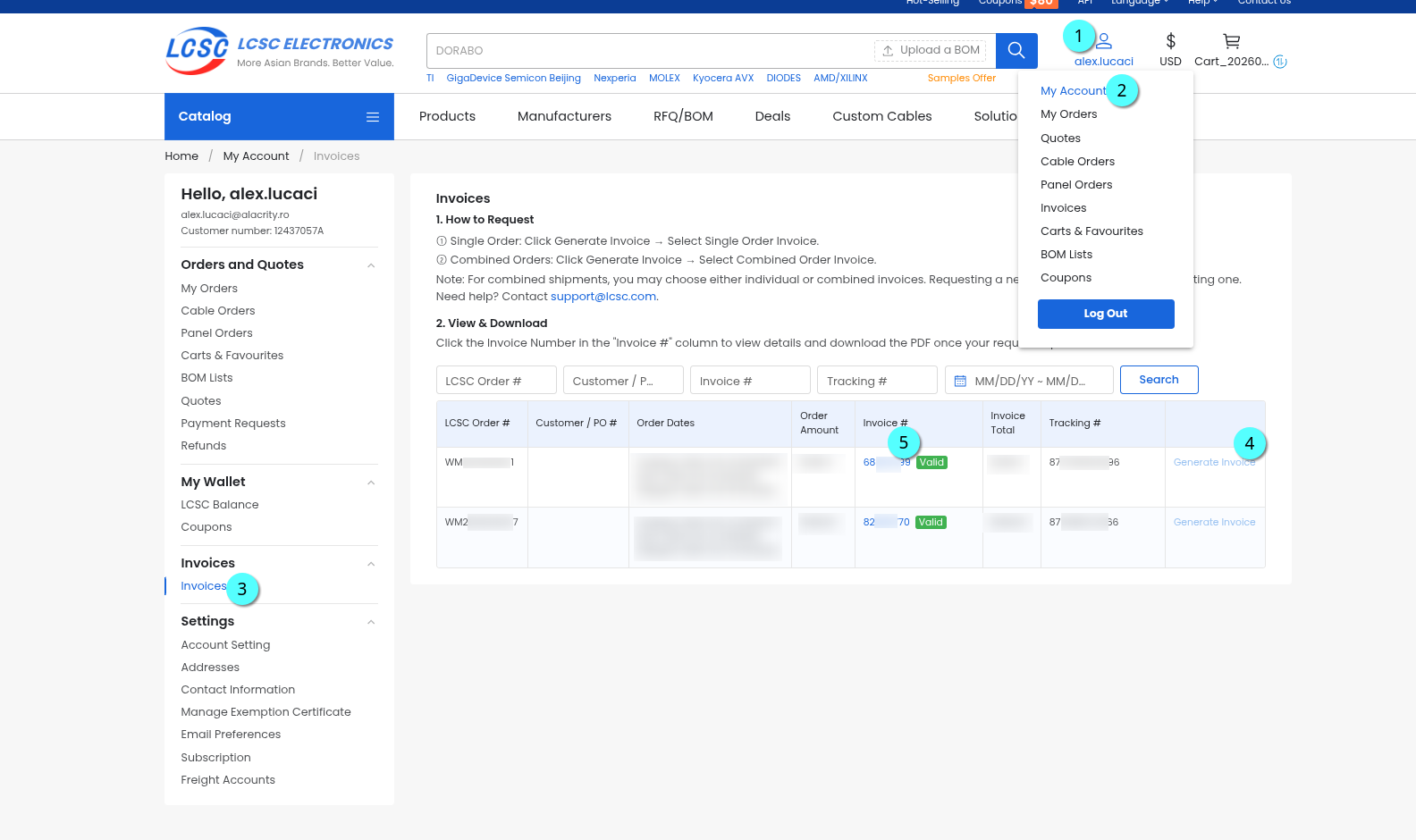
- Click on account (login if neccessary)
- My Account
- Invoices (bottom left)
- Find your latest order, click on Generate Invoice. Wait 1 minute then refresh the page.
- Download the invoce. It will be in english.
 |
|---|
Translate to RO
Go to claude.ai, login with your NGO account and configure the model:
- Model: Opus 4.8 or newer
- Effort: XHigh
Give claude the invoice (drag and drop) and the following prompt:
Translate the attached LCSC invoice into Romanian (with diacritics).
- Keep layout, pages, logo and stamp identical; output PDF.
- Do not translate: names, addresses (except country), part numbers,
  codes, dates, amounts, HTSUS/COO/DC values.
- Terms: Bill To = Cumpărător, Ship To = Destinatar, Vendor = Furnizor,
  Tracking # = Nr. AWB.
- Translate descriptions as written; flag suspected supplier errors in chat only but leave the detected error as-is instead of inventing a fix.

Then create "NOTA DE UTILIZARE SI COMPOZITIE" as PDF (A4 portrait):
- Header: LCSC order no., invoice no. and date, AWB, billing and shipping address.
- Columns: Nr. Poz. | Cantitate (buc.) | Descriere comercială | Material | Utilizare
- Material rules: resistors/capacitors/NTC = ceramică, metal;
  ICs/diodes/transistors/LEDs = plastic, metal; inductors = metal, cupru;
  connectors/switches = plastic, metal; modules = FR-4, cupru, metal.
- Utilizare: "asamblarea circuitelor electronice"; thermistors/sensors = "senzor".
- Add total quantity row and a date/signature line.
- No signature and/or date field at the end.